> For the complete documentation index, see [llms.txt](https://docs.drafter.ai/llms.txt). Markdown versions of documentation pages are available by appending `.md` to page URLs; this page is available as [Markdown](https://docs.drafter.ai/scale/integrate-drafter-ai-to-other-apps-with-make.com.md).

# Integrate Drafter AI to other apps with Make.com

How to integrate Drafter AI workflows with other tools.

Sometimes you need Drafter AI’s flows to work in a background mode, as an addition to the tools you use in everyday work.

To do that, use [Make](https://make.com) (former Integromat) to integrate Drafter AI’s workflows with 1000+ other tools.

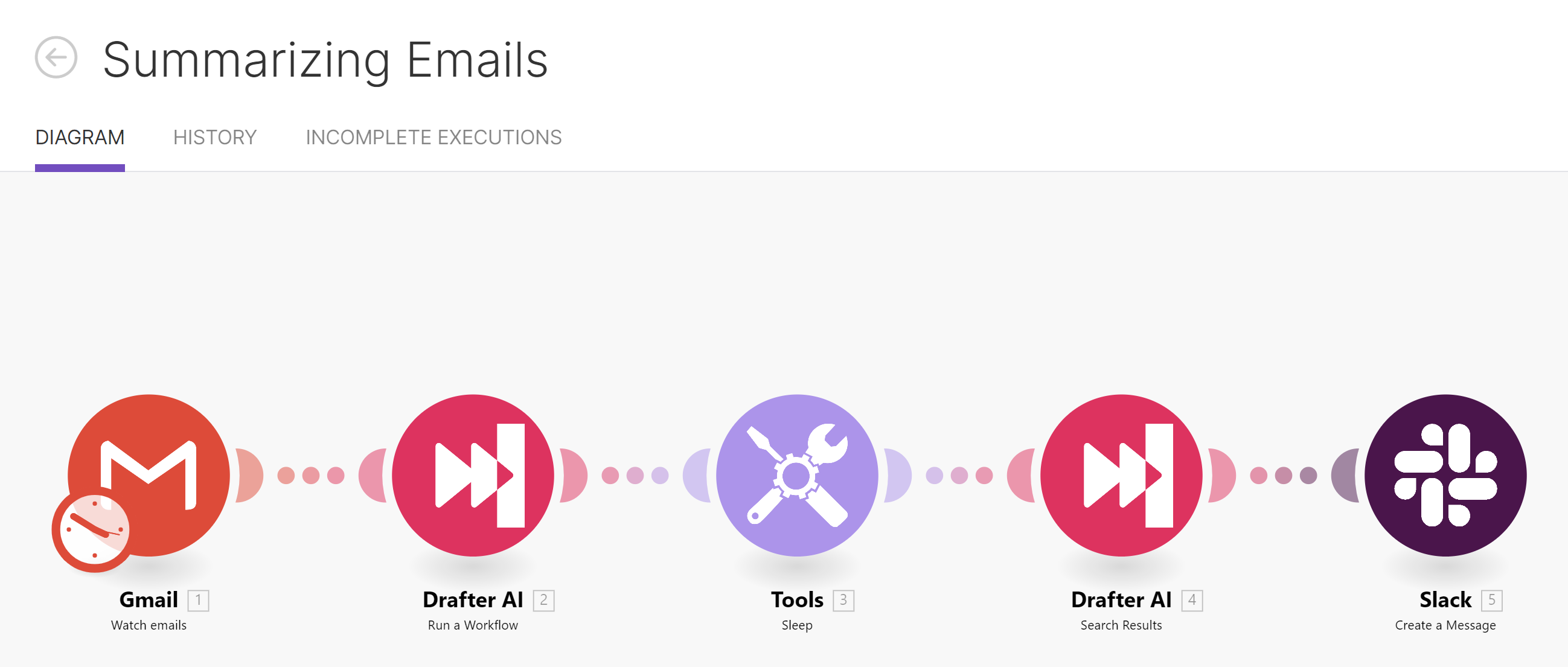
**Example:** This is how the email summarization flow looks like with Drafter AI - Make:

<figure><img src="https://3372553292-files.gitbook.io/~/files/v0/b/gitbook-x-prod.appspot.com/o/spaces%2FwSmFzVcnCrIF1wbU8Chb%2Fuploads%2FOHqY8XaO3sIKMboXPArR%2FUntitled%2035.png?alt=media&amp;token=d6b3d015-72f0-4843-b26f-bdcaa4dce3e9" alt=""><figcaption><p>Summarizing emails to Slack with Drafter AI-Make connection</p></figcaption></figure>

It reads incoming emails, and then drops them into a specific category, and sends it to Drafter AI to summarize.

After that, the email summary is displayed in your Slack channel.

Let’s see, how to build such flows.

If you have no Make.com account - register (It's free and takes 5 mins)

{% embed url="<https://www.make.com/en>" %}

## 1. Get your API Key

To get your API key, proceed to <mark style="background-color:blue;">**"Settings"**</mark> > <mark style="background-color:blue;">**"Integrations"**</mark>:

<figure><img src="https://3372553292-files.gitbook.io/~/files/v0/b/gitbook-x-prod.appspot.com/o/spaces%2FwSmFzVcnCrIF1wbU8Chb%2Fuploads%2Fgss9KBITdwe1qESk8FhQ%2FUntitled%2036.png?alt=media&amp;token=0ab8b4e0-762d-4f07-8ab4-4afefc9e04e9" alt=""><figcaption><p>Getting API key</p></figcaption></figure>

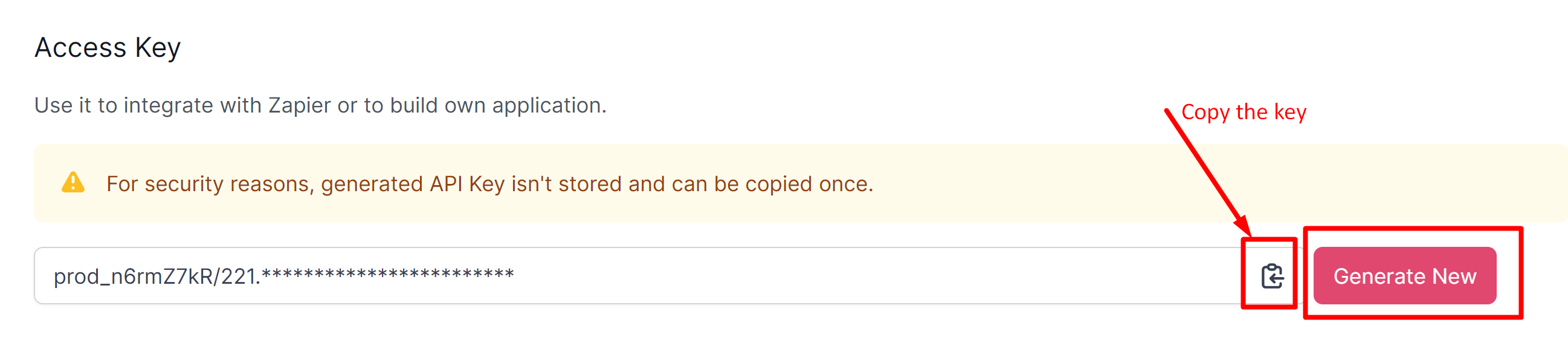
**Generate API Key:**

<figure><img src="https://3372553292-files.gitbook.io/~/files/v0/b/gitbook-x-prod.appspot.com/o/spaces%2FwSmFzVcnCrIF1wbU8Chb%2Fuploads%2FJYUn13nMWz8UGgXLBavA%2FUntitled%2037.png?alt=media&amp;token=7fe47775-0a68-4fbb-9aa3-7f480298de7c" alt=""><figcaption><p>Generating API Key</p></figcaption></figure>

{% hint style="warning" %}
You can generate and copy your API key **only once.**

If you forget or lose it, to use it again you'll need to re-generate it.

It's done to comply with the current security policies and protect your instance,
{% endhint %}

##

## 2. Connect the Drafter AI app and Make.com

To get access to it, follow the [invitation link](https://www.make.com/en/hq/app-invitation/fac6a7ed0349793e6c3df9f955d7fe3c) (Make).

{% embed url="<https://www.make.com/en/hq/app-invitation/fac6a7ed0349793e6c3df9f955d7fe3c>" %}
Getting access to Drafter AI's connection for Make.com
{% endembed %}

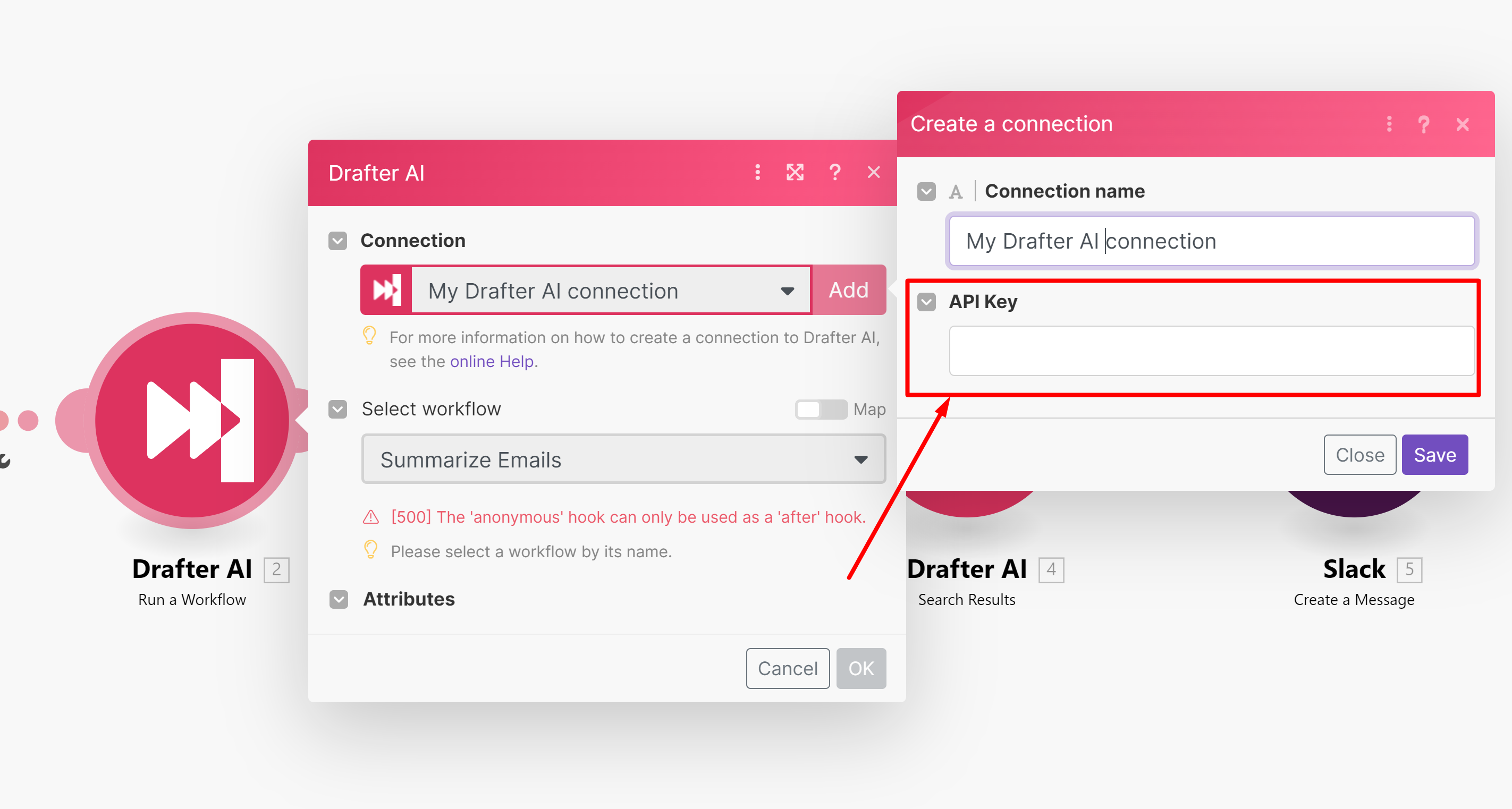
Use your API Key to create a connection with Drafter AI on Make.com:

<figure><img src="https://3372553292-files.gitbook.io/~/files/v0/b/gitbook-x-prod.appspot.com/o/spaces%2FwSmFzVcnCrIF1wbU8Chb%2Fuploads%2F2JUQq2rKKfxgZhRqXR8R%2Fimage.png?alt=media&amp;token=b2e2030a-07ba-4046-91cd-a757170c5984" alt=""><figcaption><p>Providing API Key to connect Drafter AI and Make.com</p></figcaption></figure>

## 3. Use Drafter AI events in Make.com scenarios

#### Run a Workflow

Triggers execution of the workflow on Drafter AI's side in the middle of the workflow.

{% hint style="info" %} <mark style="color:blue;">Use Case</mark>

You're getting data from 3rd party tools and sending it to Drafter AI to analyze, search or generate new data points.
{% endhint %}

#### Search Workflow

Searches for data from results of specified workflow executions on your Drafter AI instance.

{% hint style="info" %} <mark style="color:blue;">Use Case</mark>

You started workflow execution before, waited till it ends, and would need to extract results to send to other tools.
{% endhint %}

#### Trigger: Workflow Execution

Make.com flow starts automatically when the workflow on Drafter AI's side is finished.&#x20;

{% hint style="info" %} <mark style="color:blue;">Use Case</mark>

You need to automatically send data to other tools when batch processing on Drafter AI's side ends.
{% endhint %}

## Some ideas for No-code integration scenarios

<table data-view="cards"><thead><tr><th></th><th></th><th></th></tr></thead><tbody><tr><td><strong>Hubspot + Drafter AI</strong></td><td>Automaticaly generate personalized messages for new leads in Hubspot CRM.</td><td></td></tr><tr><td><strong>Salesforce + Drafter AI</strong></td><td>Answer manager's questions automatically by interpreting RevOps data from Salesforce.</td><td></td></tr><tr><td><strong>Slack + Drafter AI</strong></td><td>Get corporate ChatGPT that uses both public and internal knowledge to answer your team's questions precisely.</td><td></td></tr><tr><td><strong>Airtable + Drafter AI</strong></td><td>Empower Airtable with automated search, translation, classification or content generation features.</td><td></td></tr><tr><td><strong>Bubble.io + Drafter AI</strong></td><td>Build AI-powered web apps that perform all kinds of AI actions for users.</td><td></td></tr><tr><td><strong>Gmail + Drafter AI</strong></td><td>Automatically extract data from incoming emails and draft relevant emails and replies in seconds.</td><td></td></tr></tbody></table>

And many more.&#x20;

Here's what our customers do with Drafter AI integrated with other tools.

**TBD**

If you need to integrate Drafter AI directly - use developer API.